

Demystifying Salesforce CRM Implementation for Your Business
Why Salesforce CRM Implementation Can Transform Your Business

Salesforce CRM implementation is the end-to-end process of setting up, configuring, and deploying Salesforce so it fits how your business actually works — including moving your data, connecting your tools, and training your team to use it.
Here's a quick overview of what it involves:
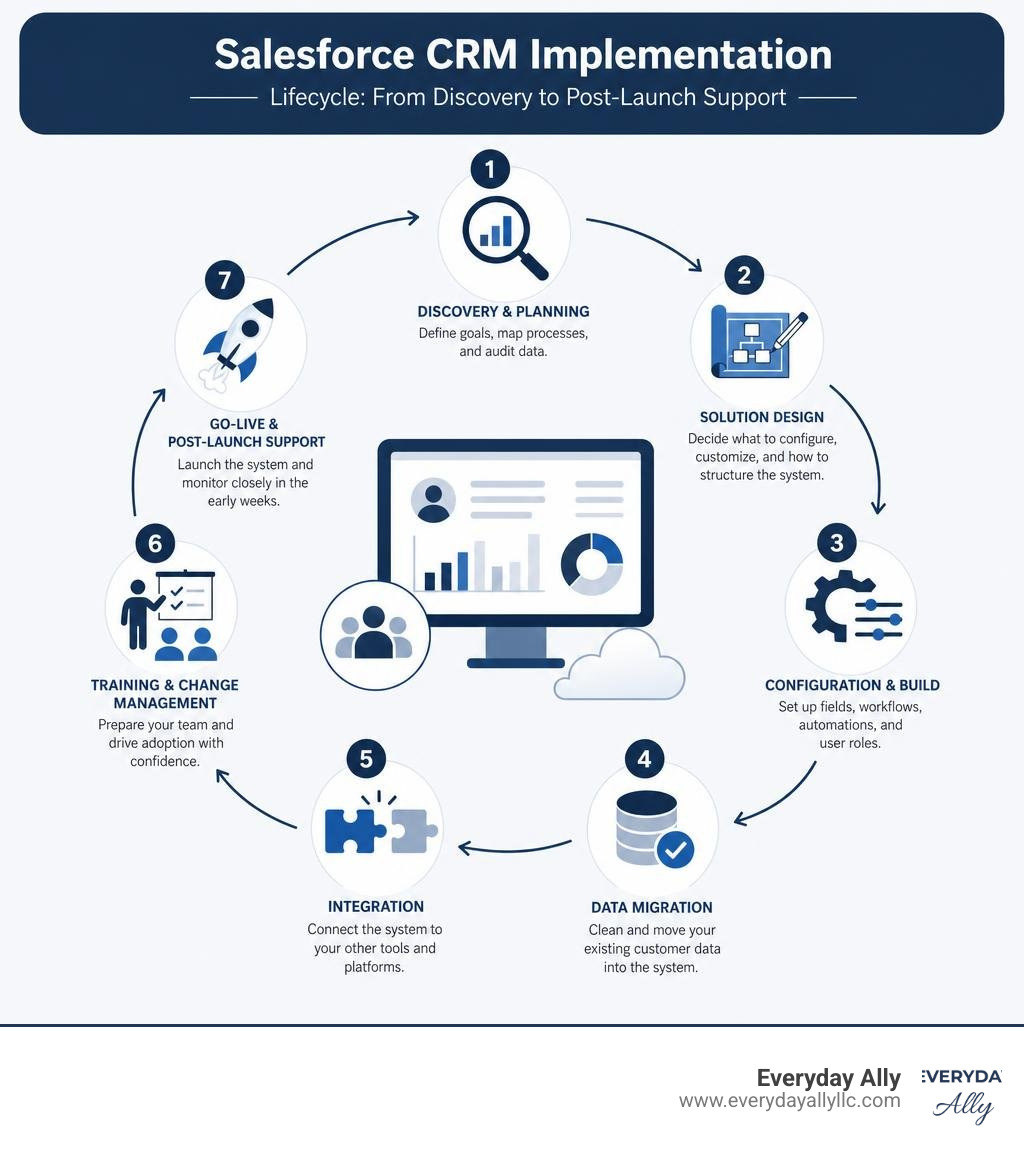
- Discovery & Planning - Define your goals, map your processes, and audit your data
- Solution Design - Decide what to configure, what to customize, and how to structure your system
- Configuration & Build - Set up fields, workflows, automations, and user roles
- Data Migration - Clean and move your existing customer data into Salesforce
- Integration - Connect Salesforce to your other tools (email, ERP, marketing platforms)
- Training & Change Management - Get your team ready and confident to use the system
- Go-Live & Post-Launch Support - Launch the system and monitor it closely in the early weeks
If you're a small business owner right now, there's a good chance your customer data lives in spreadsheets, inboxes, and sticky notes. Your sales process is inconsistent. Your marketing doesn't connect to your pipeline. Sound familiar?
That's exactly the problem Salesforce is built to solve. But here's what most people don't tell you upfront: buying Salesforce and implementing Salesforce are two very different things.
The platform is powerful — businesses report a 30% increase in lead conversion and a 28% increase in sales revenue after a proper rollout. But those results don't come from just switching it on. They come from a structured, thoughtful implementation process.
And the stakes are real. 30% of all CRM projects fail — not because of bad technology, but because of poor planning, dirty data, and undertrained teams.
This guide breaks down everything you need to know to get it right.
What is a Salesforce CRM Implementation and Why Does It Matter?
At its core, a salesforce crm implementation is not a simple software installation. Because Salesforce is a highly customizable, cloud-based software-as-a-service (SaaS) platform, implementing it means translating your unique real-world business workflows into a digital environment. It means connecting your sales, marketing, and customer service departments under one unified roof to create a true 360-degree view of your customer.
When done right, the business impact is massive. Beyond driving a 30% increase in lead conversions and a 28% boost in sales revenue, a successful rollout delivers a 45% increase in customer retention. It also yields a 44% overall boost in team productivity.
In June 2026, implementing Salesforce is no longer just about tracking contacts and deals. We have entered the era of the "Agentic Enterprise." Modern implementations leverage Agentforce, Salesforce's groundbreaking suite of autonomous AI agents. These AI agents do not just sit passively in your dashboard; they actively execute tasks, qualify leads, automate customer service, and surface predictive sales forecasts.
Today, 89% of global business decision-makers consider AI strategy and capabilities when partnering with a CRM vendor. By deploying a system like Salesforce, your business gains access to conversational AI and autonomous agents that can resolve customer cases with incredible efficiency. In fact, Salesforce's own internal support teams use these AI agents to resolve 84% of their customer service cases autonomously.
To experience these cutting-edge capabilities firsthand, you can Try The World's #1 Agentic CRM - Salesforce and see how unified data can revolutionize your operations.

The 7-Phase Roadmap to a Successful Deployment
Think of a salesforce crm implementation like building a custom house. You wouldn't start pouring concrete without a blueprint, and you wouldn't move your furniture in before the roof is finished.
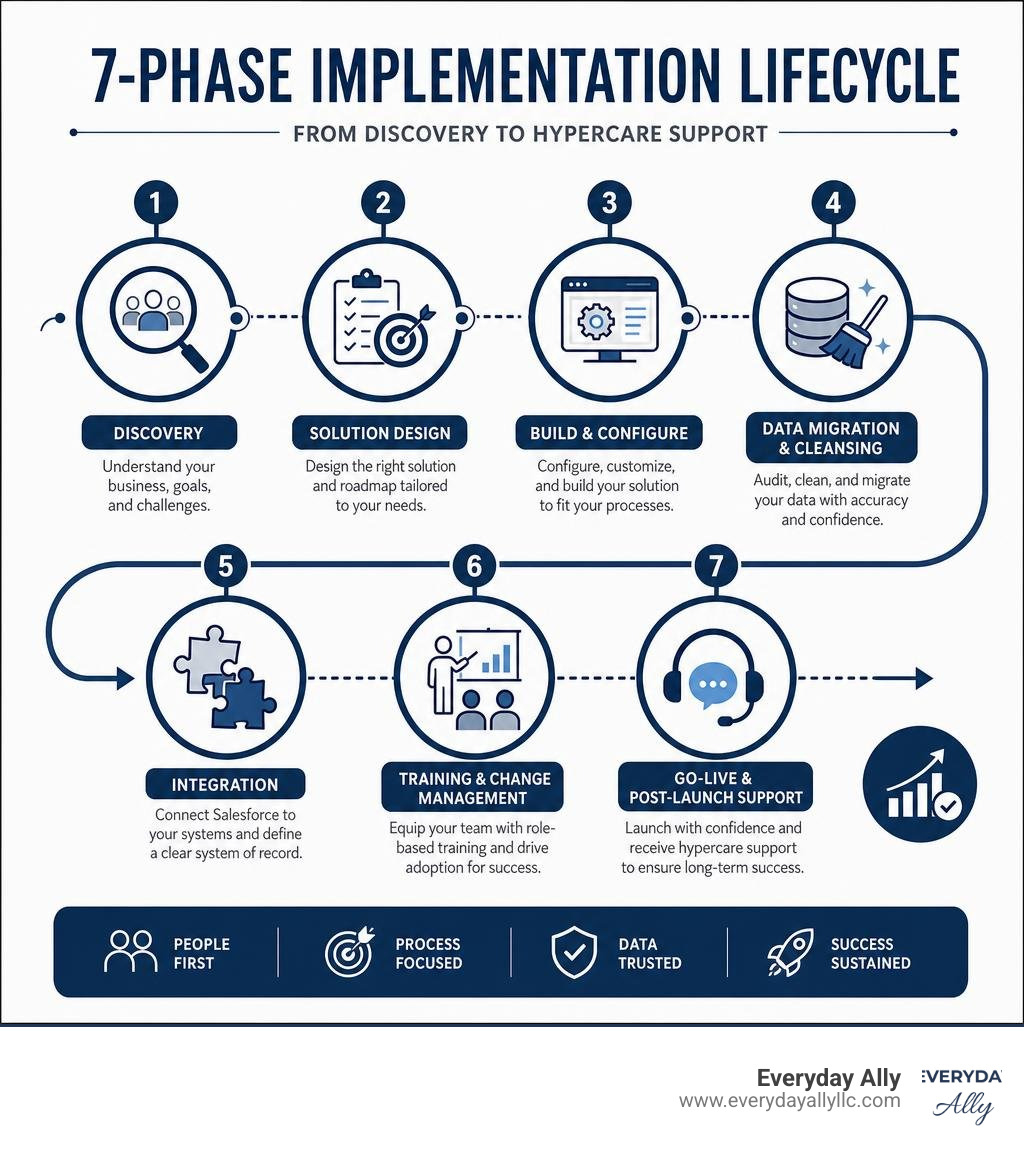
To ensure your system is structurally sound, we follow a highly successful, structured 7-phase roadmap. For a high-level technical overview of this process, you can consult the official Salesforce Implementation Guide - Salesforce Help to understand standard configurations.
Let's walk through these phases step-by-step.
Phase 1 to 3: Discovery, Design, and Configuration
The first three phases of our roadmap lay the foundation for your entire CRM setup.
Phase 1: Discovery & Business Analysis
Before we touch a single setting in Salesforce, we must understand your current business processes, pain points, and goals. We sit down with stakeholders across your departments—sales, marketing, customer service, and IT—to map out how information flows. We ask critical questions: What pain points do you hope to fix? What specific metrics will define success? This is where we separate the "must-have" features for Phase 1 from the "nice-to-have" features for Phase 2.
Phase 2: Solution Design & Architecture
Once we have our blueprint, we design the system. This involves mapping your operational workflows to the Salesforce data model. We design custom fields, define user roles, establish record visibility permissions, and plan how Salesforce will talk to your other business tools.
Phase 3: Configuration & Build
With the design approved, the actual build begins. We configure the platform using Salesforce's built-in, "click-not-code" tools. We build custom fields, page layouts, validation rules, and automated workflows using Salesforce Flow.
A golden rule we always follow is: configure before you customize. Around 78% of Salesforce instances involve significant customizations. However, out-of-the-box configuration is much easier to maintain. We only write custom code (such as Apex triggers or Lightning Web Components) when standard tools cannot meet a highly complex business requirement.
If you want to ensure your system is designed with long-term scalability in mind, partnering with experts for Consulting and Training is the best way to avoid expensive technical debt down the road.
Phase 4 & 5: Data Migration and Integration in Salesforce CRM Implementation
Once the system is built, we have to fill it with your data and connect it to your business ecosystem.
Phase 4: Data Migration & Cleansing
Data migration is the phase most responsible for go-live delays and project failures. The reality is that Salesforce will not fix a bad business process, and it certainly won't fix bad data—it will simply automate your messy data at a faster scale.
Currently, 76% of CRM users report that less than half of their organization's CRM data is accurate and complete. Furthermore, 53% of organizations cite poor data quality as their number-one barrier to AI adoption.
Before migrating, we must audit, clean, and deduplicate your source data. We map every legacy data field to its new home in Salesforce. We then run multiple test migrations in a sandbox environment to validate that the data lands exactly where it should. For a detailed technical walkthrough on preparing your data imports, refer to the Get Started with Sales Cloud Implementation Guide.
Phase 5: Integration
Your CRM shouldn't live on an island. In Phase 5, we connect Salesforce to your existing tech stack, such as your email clients, ERP platforms, or marketing automation software. Whether we are using native AppExchange connectors, middleware like MuleSoft, or custom APIs, we define a clear "system of record" for every data field to prevent data conflicts.
Phase 6 & 7: Training, Go-Live, and Post-Launch Support
The final phases are entirely focused on your people and keeping the system running smoothly.
Phase 6: Training & Change Management
You can build the most advanced Salesforce org in the world, but if your employees do not use it, your return on investment (ROI) will be zero. Shockingly, 53% of organizations state that better onboarding and training would make their CRM significantly more effective.
We don't believe in "one-size-fits-all" training. Instead, we design role-based learning paths tailored to specific user personas (for example, training sales reps on logging opportunities, and customer service agents on managing service cases). This role-tailored approach increases user efficiency by 68%.
Because 70% of information is forgotten within 24 hours without reinforcement, we also build microlearning resources, interactive walkthroughs, and hands-on practice sessions to ensure long-term retention.
Phase 7: Go-Live & Post-Launch Support
After rigorous testing, we execute our go-live checklist and launch the system. We immediately enter a 2-to-4-week "hypercare" support period. During this time, we closely monitor system performance, resolve any unexpected edge cases, and gather direct feedback from users.
To help your team stay aligned and access continuous learning materials post-launch, we recommend utilizing a centralized resource hub like The Ally Hub to keep your team up to speed on platform updates.
Timeline, Costs, and Staffing: In-House vs. Partner
Planning a salesforce crm implementation requires a clear understanding of your timeline, budget, and human resource needs. Let's look at how these elements break down.
| Implementation Aspect | In-House Implementation | Partner-Led Implementation |
|---|---|---|
| Typical Timeline | 3 to 12+ Months (often delayed due to internal priorities) | 4 Weeks to 6 Months (structured, milestone-driven) |
| Upfront Cost | Lower direct fees, but high internal labor costs | Higher upfront consulting fees, but faster time-to-value |
| Risk of Failure | High (often due to lack of certified expertise) | Low (mitigated by certified architects and structured QA) |
| Data Quality & Security | Dependent on internal IT capabilities | Handled by certified data migration specialists |
| Post-Launch Adoption | Often low due to lack of structured change management | High due to customized, role-based training programs |
When budgeting for your project, Salesforce pricing is structured around annual licensing fees, which vary depending on the edition you select (such as Professional, Enterprise, or Unlimited). To evaluate which license tier fits your business, you can explore the official Salesforce Pricing and Licensing Plans. However, keep in mind that your total Year 1 cost will also include implementation services, data migration, integrations, and ongoing support.
Small Business vs. Enterprise Salesforce CRM Implementation
The scale of your salesforce crm implementation depends entirely on the size and complexity of your organization.
Small-to-Medium Businesses (SMBs)
For smaller businesses, the primary goals are speed, simplicity, and budget control. SMB implementations typically focus on core Sales Cloud or Service Cloud features. They often utilize "Quickstart" packages to get up and running in 4 to 8 weeks. Total Year 1 implementation costs for SMBs typically range from $15,000 to $75,000. The focus is on eliminating spreadsheets, automating basic follow-ups, and establishing a clean customer database.
Enterprise Organizations
Enterprise deployments are vastly different. They are usually multi-cloud projects (combining Sales, Service, Marketing, and Experience Clouds) that require deep integration with legacy ERPs or custom databases. These projects involve complex global security requirements, multiple business units, and custom Apex code. Enterprise implementations can take 6 to 18 months and easily exceed $500,000 in services.
No matter your business size, starting with a professional Consultation can help you define a realistic scope, avoid over-customizing, and keep your budget in check.
Choosing Between In-House Teams and Certified Partners
Can you manage a Salesforce rollout completely in-house? Technically, yes—if you have a dedicated, Salesforce Certified Administrator on staff who can commit 20+ hours a week to the build, alongside experienced developers for integrations.
However, relying entirely on an in-house team that has never deployed Salesforce before is highly risky. It often leads to "feature overload," messy data structures, and low user adoption.
To staff an implementation successfully, you need several key roles:
- Executive Sponsor - To champion the project and drive company-wide adoption.
- Business Analyst - To translate your business processes into technical requirements.
- Project Manager - To keep the timeline and budget on track.
- Salesforce Administrator & Developer - To build, customize, and maintain the system.
- Data Migration Specialist - To clean and import your customer records.
Hiring a certified Salesforce partner mitigates these staffing challenges. A partner brings certified architects, developers, and change management specialists to your project on day one. They ensure your system is built correctly the first time, preventing expensive rework. If you are weighing these options, reading through CRM Implementation: A Comprehensive 9 Step Guide | Salesforce can provide deeper insights into the strategic benefits of expert guidance.
Furthermore, if you are looking for local consulting and training resources in Texas, you can evaluate regional experts through the Top Salesforce Consultants in Texas - Jun 2026 Rankings | Clutch.co . For businesses in El Paso, TX, utilizing specialized local programs like Salesforce Training El Paso, TX | ONLC or Salesforce Training Classes El Paso, Texas can be an excellent way to upskill your in-house team during the rollout.
Frequently Asked Questions About Salesforce CRM
Navigating a CRM rollout can feel overwhelming. Here are answers to some of the most common questions we hear from business owners.
How long does a typical Salesforce implementation take?
The timeline depends entirely on scope and complexity. A standard single-cloud deployment for a small-to-mid-market business typically takes 8 to 14 weeks from kickoff to go-live. A highly complex, multi-cloud enterprise deployment with custom integrations and massive data migration can take 6 to 18 months.
What are the primary costs associated with Salesforce CRM?
The total cost of ownership consists of three main parts:
- Salesforce Licenses: Paid annually per user.
- Implementation Services: The cost to design, build, and migrate data (often 2 to 3 times the annual license cost).
- Ongoing Support: Internal admin salaries, training, and continuous optimization.
Be careful to watch out for "hidden costs," such as third-party AppExchange subscriptions, data storage limits, and post-launch training updates.
Why do 30% of CRM projects fail?
CRM projects rarely fail because of the technology itself. The top reasons for failure include:
- Lack of Executive Sponsorship: If leadership doesn't actively use and support the system, the team won't either.
- Dirty Data: Migrating unorganized, duplicate data leads to immediate user frustration.
- Poor User Adoption: Treating training as a brief afterthought rather than a dedicated workstream.
- Over-Customizing: Building complex custom code where standard Salesforce features would have worked perfectly.
Conclusion
A successful salesforce crm implementation is one of the most transformative investments your business can make. It has the power to break down departmental silos, supercharge your team's productivity, and unlock predictive, AI-driven insights that keep you ahead of the competition.
But remember: Salesforce is a journey, not a one-time destination. The businesses that achieve the highest ROI are those that treat their CRM as an evolving asset—continuously optimizing workflows, keeping data clean, and training their teams on new features.
At Everyday Ally, we specialize in helping small and mid-sized businesses in El Paso, TX, throughout Texas, and nationwide navigate this journey with confidence. Our unique strength lies in integrating your Salesforce CRM data directly with your marketing strategy. By connecting these two powerhouses, we help you turn raw customer data into highly qualified leads, streamlined operations, and measurable revenue growth.
Ready to stop guessing and start growing? Let's build a CRM system that actually works for your business. Explore our Salesforce Consulting services today, and let's unlock your business's true potential together.