

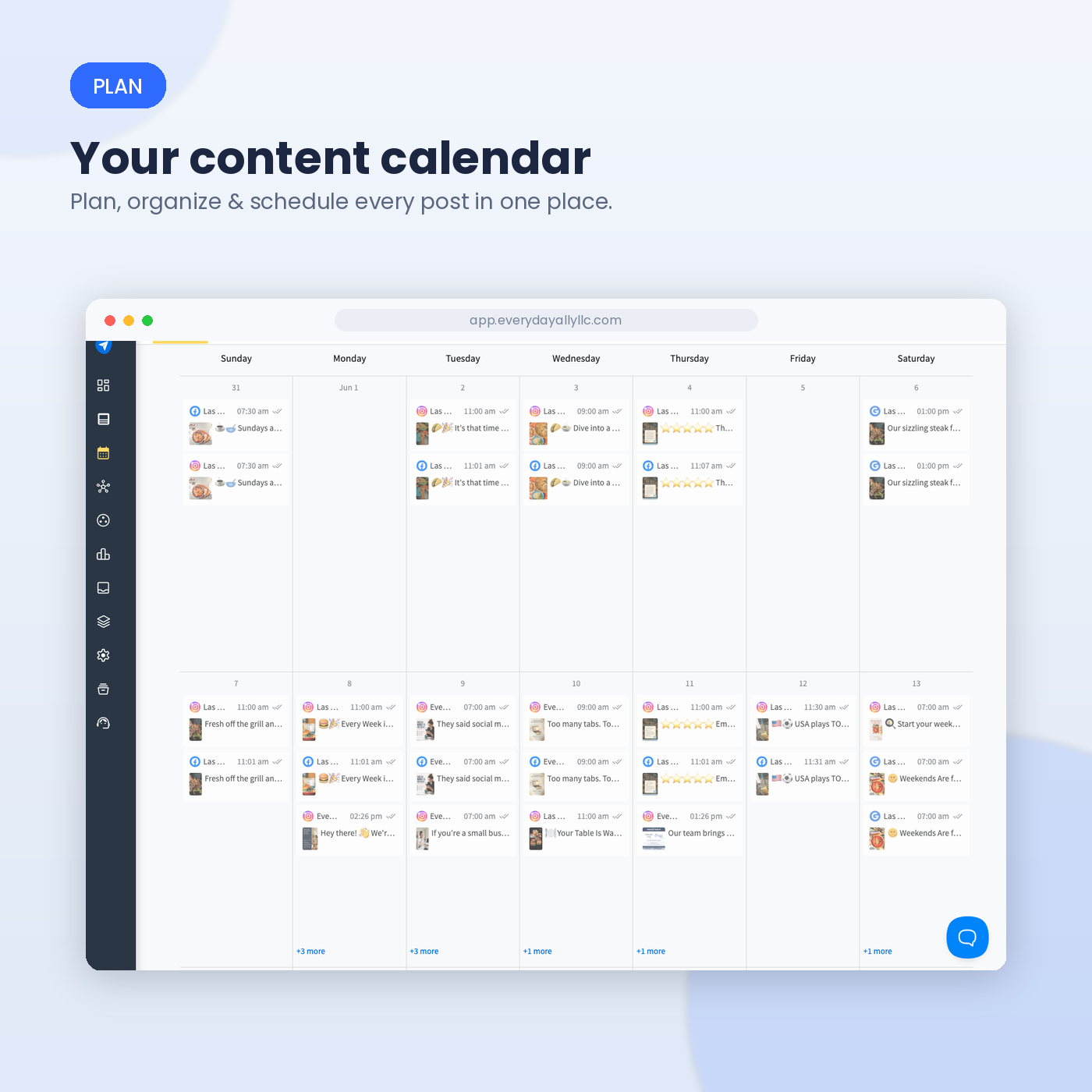
How Often Does a Small El Paso Business Really Need to Post — and What to Post
Wondering how often your business should post on social media? The answer might surprise you. You don't need to post every day to stay visible. For most small businesses, 3–5 quality posts per week is the sweet spot. Learn which platforms deserve your attention, what to post when you're out of ideas, and how consistency—not constant posting—helps you attract more customers.
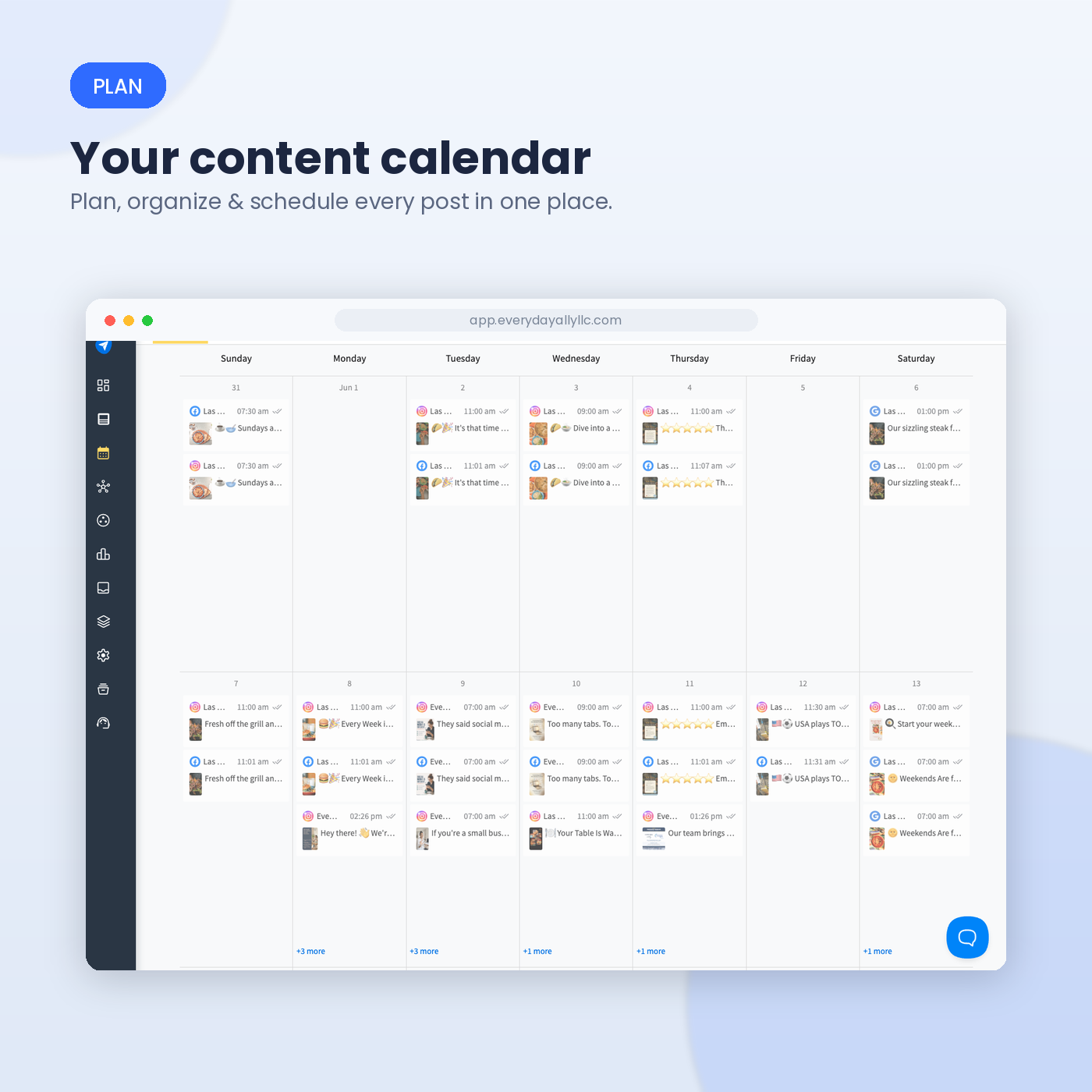
Your Content Calendar
Everyday Ally plans, organize and schedules your content in one place.
If you've ever stared at your phone wondering whether today is "a posting day," you're not alone. It's one of the most common questions small business owners ask, right up there with "how do I get more reviews?" and "why isn't anyone seeing my posts?" The honest answer is less complicated than most social media gurus make it sound — and it has nothing to do with posting every single day.
The short answer: 3-5 times a week, not daily
For most small, local businesses, the sweet spot is three to five posts per week across your main platforms. That's enough to stay visible in the algorithm and in your customers' minds, without burning you out or turning content creation into a second full-time job.
Daily posting sounds impressive, but it's rarely sustainable for an owner who's also running the actual business. And here's the thing: a rushed, low-effort post published just to "keep the streak going" does less for you than a thoughtful post published three times a week. Consistency beats volume every time — a steady rhythm you can actually maintain will outperform a burst of daily content that fizzles out after two weeks.
It varies a bit by platform
Not all platforms want the same thing from you:
Instagram rewards businesses that post 3-5 times a week, especially when you mix in Stories and Reels between feed posts. This is usually the highest-value platform for restaurants, retail, and service businesses with anything visual to show off — food, finished projects, before-and-afters, your team at work.
Facebook still matters a lot for local audiences, particularly anyone over 35 searching for businesses in their neighborhood. Facebook tends to reward slightly more frequent activity — up to once or twice a day if you have the content to support it — but 4-5 solid posts a week works just fine for most small businesses.
LinkedIn, if you're B2B or working with other local businesses, only needs 2-3 posts a week. This platform rewards clarity and relevance over volume — nobody wants a feed clogged with low-effort updates.
The takeaway: pick the one or two platforms where your actual customers spend their time, and focus your energy there instead of spreading yourself thin trying to be everywhere.
Why inactivity is riskier than imperfection
Here's the uncomfortable stat worth sitting with: the majority of social media users say that if a business goes quiet or stops responding, they'll simply take their money to a more active competitor. In a city like El Paso, where word-of-mouth and local loyalty carry real weight, a stale or abandoned page can quietly cost you customers you never even knew were looking.
That doesn't mean you need to panic-post. It means an empty page is worse than an imperfect one. A business posting three so-so photos a week beats a business that posted once in April and never again.
So what should you actually post?
Frequency is only half the equation — the other half is having something worth posting. If you're staring at a blank content calendar, here's a simple rotation that works for almost any local business:
Behind the scenes. Customers trust businesses they feel like they know. A quick video of prep in the kitchen, a photo of your team setting up for the day, or a shot of the workspace mid-project builds familiarity fast.
Customer moments. A happy customer, a finished job, a five-star review turned into a graphic. Social proof is some of the highest-converting content you can post, and it costs you nothing but a photo and a caption.
Answers to real questions. Think about what customers ask you on the phone or at the counter every week. "Do you take walk-ins?" "How long does this usually take?" "What's your busiest time?" Turning those into short posts does double duty: it's useful content, and it cuts down on repetitive questions later.
Local relevance. A shoutout to a nearby event, a seasonal tie-in, or a nod to something happening in the neighborhood signals that you're a real, present part of the community — not a faceless account posting generic stock content.
The occasional offer or reminder. Not every post needs to sell something, but one out of every five or six is a good ratio for a gentle nudge — a reminder to book, a limited-time offer, or simply "we're open and here for you."
The real goal: a rhythm you won't abandon
The businesses that win at social media long-term aren't the ones with the fanciest content — they're the ones who show up consistently, month after month. Pick a realistic number (start with three posts a week if you're not sure), pick your platform, and build a simple rotation from the ideas above. You'll spend less time agonizing over "what do I post today" and more time running your business.
If putting together a posting rhythm still feels like one more thing on an already-full plate, that's exactly the kind of thing we help local businesses figure out — from the calendar to the content itself. Reach out and let's build a plan that fits how you actually work.
Sources consulted for this post: Buffer's 2026 Social Media Frequency Guide, HeyOrca's Optimal Posting Frequency by Platform (2026), The Small Business Expo.

Instagram vs. Facebook for Local El Paso Businesses: Where Your Customers Actually Are
Instagram or Facebook for your El Paso business? Here's how to tell where your customers actually are — and post to both without doubling your work.

What’s the right platform for your business?
If you run a business in El Paso, you've probably heard some version of the same advice a hundred times: "You have to be on social media." What nobody tells you is which platform actually deserves your limited time. You've got a shop to run, a staff to manage, and maybe forty-five minutes a week to spend on marketing if you're lucky. Spreading yourself thin across every app is a recipe for burnout and posts that go nowhere.
So let's cut through it. Instagram and Facebook are both owned by Meta, they share an ad system, and they can even cross-post to each other. But they are not the same tool, and your customers don't behave the same way on them. Here's how to figure out where your people actually are.
The Quick Answer: Follow the Ages
The single biggest difference between the two platforms comes down to who's using them.
Instagram skews younger. In the U.S., adults aged 25–34 make up the largest slice of Instagram's audience at about 28%, with 18–24-year-olds close behind at roughly 27%. Nearly two-thirds of Instagram users are between 18 and 34, and about three in four Americans aged 18–29 are on the platform. It also leans slightly female, at roughly 55% women.
Facebook is where the grown-ups live. Around 71% of U.S. adults use Facebook, and its strength is with people 30 and older. Roughly 80% of adults aged 30–49 use it, and even among Americans 65 and older, about 57% are still active. That older-user loyalty is something no other major platform can match.
Translate that to El Paso: if your customers are quinceañera planners, first-time homebuyers in their late twenties, taqueria regulars in their thirties, or families booking birthday parties, you're likely fishing in both ponds. But the tone and the content need to match the water.
What Each Platform Is Actually Good At
Think of it less as "young vs. old" and more as "discovery vs. community."
Instagram is a discovery engine. It's visual-first, it rewards good photos and short video (Reels), and its Explore page and hashtags can put you in front of people who've never heard of you. If you sell something people want to look at — food, hair, nails, floral arrangements, homes, clothing, tattoos — Instagram is where a great photo turns a stranger into a walk-in.
Facebook is a community hub. It's built for connection, longer posts, events, reviews, and local groups. El Paso runs on Facebook groups — neighborhood pages, buy-sell-trade boards, foodie communities, mom groups. A single recommendation in one of those groups can do more for a local business than a month of ads. Facebook is also where people go to check your hours, read your reviews, and message you a question before they drive over.
How to Pick (Without Overthinking It)
You don't have to choose forever. But if you only have the energy for one, start here:
Choose Instagram if your business is visual and you're trying to reach a younger, trend-aware crowd. Restaurants, cafés, salons, boutiques, bakeries, photographers, and real estate agents showcasing beautiful listings usually win here.
Choose Facebook if your customers are 35 and up, or if word-of-mouth and local groups drive your business. Home services, contractors, insurance agents, medical and dental offices, churches, nonprofits, and family-oriented businesses tend to see stronger returns.
Do both — but lightly — if your audience spans generations, which honestly describes most El Paso small businesses. The trick is not to double your workload.
The Time-Saving Move: Post Once, Show Up Twice
Here's the good news for your forty-five minutes a week: Instagram and Facebook are connected through Meta's tools, so you can create a post or a Reel once and publish it to both at the same time. Meta Business Suite lets you schedule content for both platforms from a single screen, so you're not logging in and out or copying captions by hand.
A realistic weekly rhythm for a busy owner might look like this: one photo post that goes to both platforms, one short video (Reel) that also goes to both, and one Facebook-specific touch like responding to reviews or posting in a local group. That's three actions, not six, and it keeps you visible on both without eating your week.
Don't Forget the Thing That's Not Social Media at All
A quick but important aside: for a local business, your Google Business Profile often out-earns both Instagram and Facebook when it comes to people ready to buy right now. Someone searching "breakfast tacos near me" or "AC repair El Paso" is a customer with their wallet already out. Social media builds familiarity and trust over time; Google search captures the person who needs you today. Ideally you're covering both — but if you've been pouring energy into Instagram while your Google profile sits half-finished, that's the first leak to plug.
The Bottom Line
Stop asking which platform is "better." Ask where your customers spend their attention. If they're young and you sell something worth looking at, lead with Instagram. If they're a bit older or your business runs on local word-of-mouth, lead with Facebook. Most El Paso businesses benefit from a light presence on both, powered by one weekly batch of content posted to both at once.
Pick your lead platform, commit to a simple weekly rhythm you can actually sustain, and let the other one ride along. Consistency on one platform beats exhaustion across five every single time.
Not sure where your customers are hiding, or tired of guessing at content every week? That's exactly the kind of thing we help El Paso businesses sort out — a simple plan you can stick to, so your marketing works without taking over your life. Reach out and let's map it to your business.
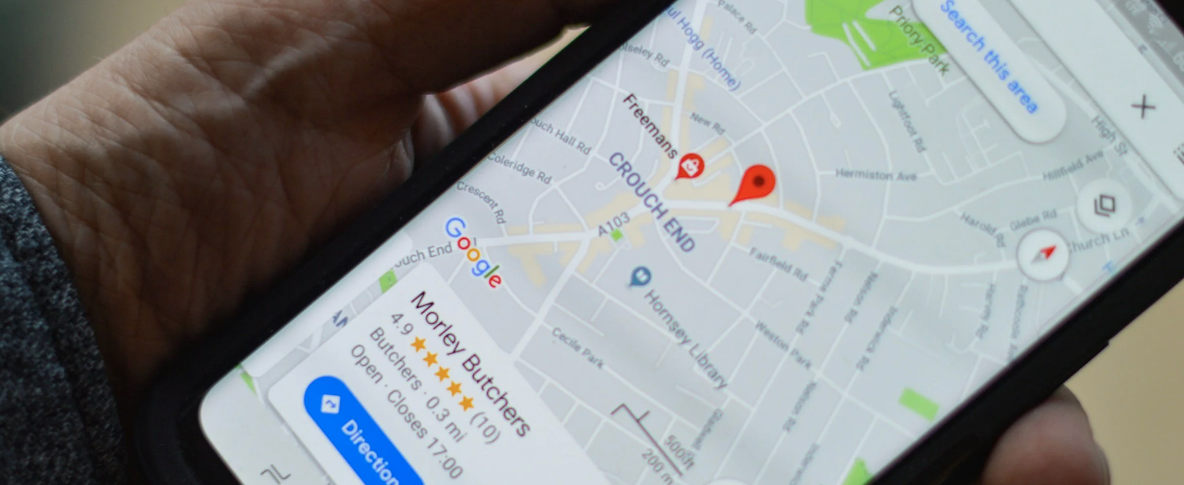
Why El Paso Businesses Lose Customers to Competitors With a Better Google Profile
Your real storefront is now the Google map that appears when someone searches "near me." Here's how El Paso businesses lose customers to a better Google profile, and how to fix yours fast.
Picture two taquerias three blocks apart on the East Side. Same menu, similar prices, both family-run for years. One has a steady line out the door at lunch. The other is quietly slower every month and can't figure out why. The difference often isn't the food, the location, or even the prices. It's what shows up the moment someone in El Paso pulls out their phone and types "tacos near me."
That moment — the search, the map, the little list of three businesses Google decides to show first — is where customers are won and lost today. And far too many local owners are handing those customers to the competitor down the street without ever knowing it happened.
The decision is made before anyone walks in
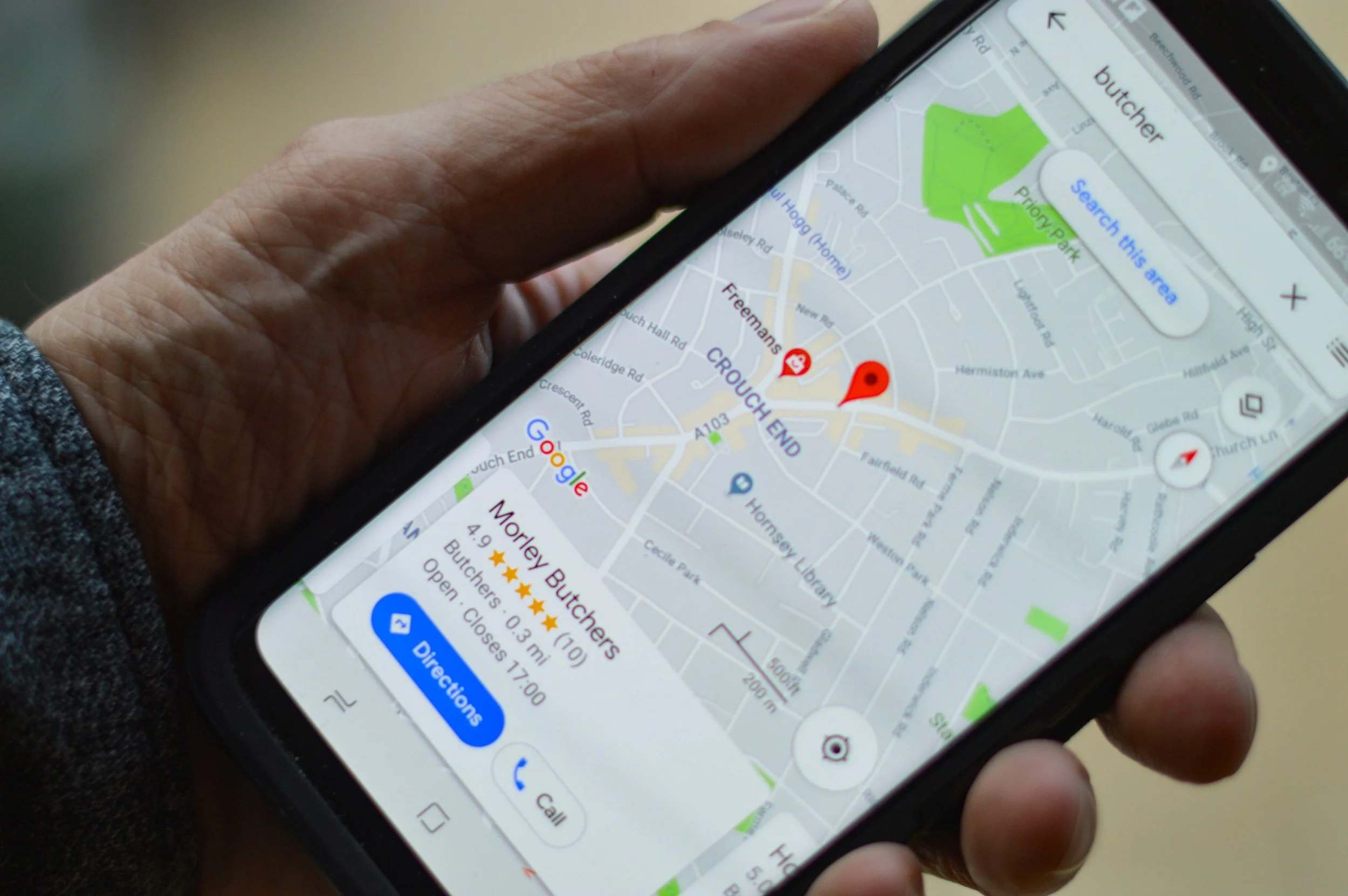
Here's the uncomfortable truth: most people choose your business, or your competitor's, before they ever see your front door. Nearly 53% of local consumers look at a Google Business Profile before they even visit a company's website, and "near me" searches now happen 1.5 billion times a month — roughly 50 million local searches every single day. Close to half of consumers say they regularly add "near me" to what they're searching for.
For an El Paso business, that means your real storefront isn't just on Mesa, Montana, or Zaragoza anymore. It's the Google map that pops up when someone at home, at work, or stuck in traffic on I-10 decides they want what you sell. If a competitor's profile looks more complete, more active, and more trustworthy than yours, the search engine quietly points the customer their way. You never get a chance to compete.
What a "better" profile actually looks like
When owners hear "better Google profile," they often picture something complicated. It isn't. A stronger profile usually just means a more complete and cared-for one. The competitor stealing your customers has likely done a handful of unglamorous things you haven't gotten around to.
Their hours are correct, including holidays — so nobody drives over to a locked door and leaves a frustrated review. Their category is specific ("Mexican restaurant," not just "restaurant"). They have real photos, plenty of them, updated more than once every two years. Their phone number and address match exactly what's on their website and Yelp. And critically, they have reviews — recent ones, with replies from the owner.
Reviews are the scoreboard customers trust
If there's one place El Paso businesses fall behind, it's reviews. And the numbers explain why it matters so much: 98% of consumers read online reviews for local businesses, and companies with 50 or more Google reviews earn 266% more leads than those with fewer than ten.
Think about your own behavior. Between a place with 14 reviews and a 3.9 rating and one with 220 reviews and a 4.6, you click the second one almost without thinking. Your customers do the same to you. The competitor isn't necessarily better — they've just built up a wall of social proof while you've been too busy running the actual business to ask anyone to leave a review.
The fix is mundane but powerful: ask. Ask happy customers at checkout, in a follow-up text, on the receipt. Reply to the reviews you already have, good and bad, because future customers read those replies as a sign you're paying attention. A calm, professional response to a one-star review often does more to win trust than the five-star reviews above it.
"Near me" is local, and you're already local
The encouraging part for El Paso owners is that local search rewards exactly what you already are: nearby and relevant. "Near me" searches have grown 150% faster than general searches over the past two years, and the businesses that win them are usually the ones that simply look the most active and trustworthy to a person standing a few miles away.
That's an advantage a national chain can't fully replicate. You can mention real El Paso neighborhoods, post about local events, and answer questions in a way that feels like a neighbor, not a call center. When your profile signals "we're right here, we're open, and people love us," Google has every reason to put you in front of that 50-million-a-day stream of local searchers.
What is this costing you right now
It's easy to treat the Google profile as a "someday" task because the cost is invisible. There's no bounced check, no angry customer — just a phone that rings a little less and a lunch rush that's a little thinner than it should be. But consider that 16% of businesses get more than 100 calls a month from their Google profile alone, and many appear in over 1,000 "discovery searches" monthly. Every one of those is a customer deciding between you and someone else. A neglected profile means you're losing a quiet percentage of them every single day, month after month, without a single line item to point to.
The good news: this gap closes fast
The flip side of all this is genuinely hopeful. Unlike a billboard or a remodel, fixing your Google presence costs almost nothing but attention. An afternoon spent completing your profile, uploading fresh photos, and texting your ten most loyal customers for a review can start shifting the map in your favor within weeks.
If you'd rather not wrestle with it alone, that's exactly the kind of thing we help El Paso businesses set up — once, correctly, so it keeps working for you. Either way, don't let the taqueria down the street keep winning a competition you didn't know you were in. Open your Google Business Profile today, look at it the way a customer would, and start closing the gap.
Want a quick, no-pressure look at how your Google profile stacks up against your competitors? Reach out, and we'll walk you through it.

Demystifying Salesforce CRM Implementation for Your Business
Why Salesforce CRM Implementation Can Transform Your Business

Salesforce CRM implementation is the end-to-end process of setting up, configuring, and deploying Salesforce so it fits how your business actually works — including moving your data, connecting your tools, and training your team to use it.
Here's a quick overview of what it involves:
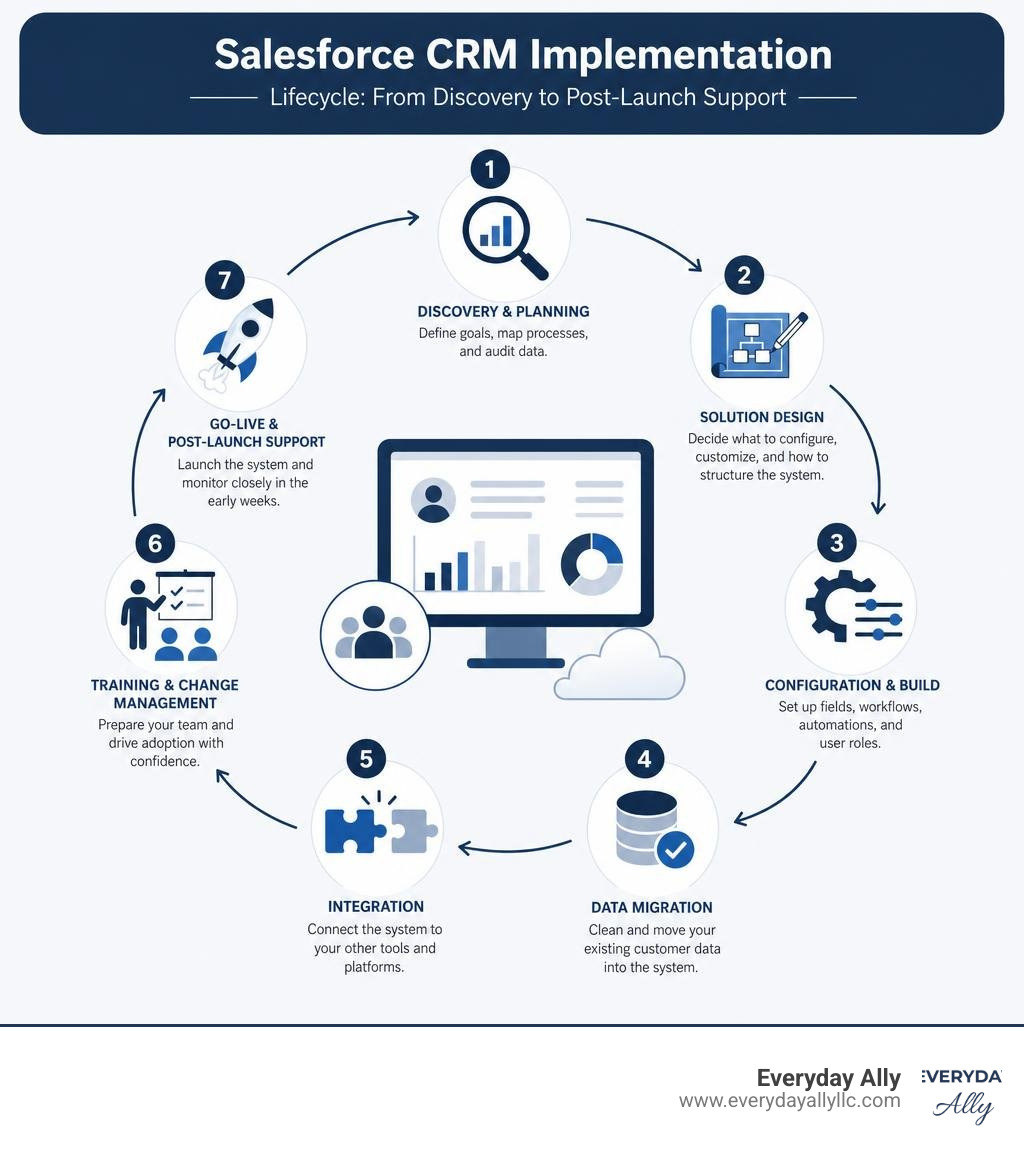
- Discovery & Planning - Define your goals, map your processes, and audit your data
- Solution Design - Decide what to configure, what to customize, and how to structure your system
- Configuration & Build - Set up fields, workflows, automations, and user roles
- Data Migration - Clean and move your existing customer data into Salesforce
- Integration - Connect Salesforce to your other tools (email, ERP, marketing platforms)
- Training & Change Management - Get your team ready and confident to use the system
- Go-Live & Post-Launch Support - Launch the system and monitor it closely in the early weeks
If you're a small business owner right now, there's a good chance your customer data lives in spreadsheets, inboxes, and sticky notes. Your sales process is inconsistent. Your marketing doesn't connect to your pipeline. Sound familiar?
That's exactly the problem Salesforce is built to solve. But here's what most people don't tell you upfront: buying Salesforce and implementing Salesforce are two very different things.
The platform is powerful — businesses report a 30% increase in lead conversion and a 28% increase in sales revenue after a proper rollout. But those results don't come from just switching it on. They come from a structured, thoughtful implementation process.
And the stakes are real. 30% of all CRM projects fail — not because of bad technology, but because of poor planning, dirty data, and undertrained teams.
This guide breaks down everything you need to know to get it right.
What is a Salesforce CRM Implementation and Why Does It Matter?
At its core, a salesforce crm implementation is not a simple software installation. Because Salesforce is a highly customizable, cloud-based software-as-a-service (SaaS) platform, implementing it means translating your unique real-world business workflows into a digital environment. It means connecting your sales, marketing, and customer service departments under one unified roof to create a true 360-degree view of your customer.
When done right, the business impact is massive. Beyond driving a 30% increase in lead conversions and a 28% boost in sales revenue, a successful rollout delivers a 45% increase in customer retention. It also yields a 44% overall boost in team productivity.
In June 2026, implementing Salesforce is no longer just about tracking contacts and deals. We have entered the era of the "Agentic Enterprise." Modern implementations leverage Agentforce, Salesforce's groundbreaking suite of autonomous AI agents. These AI agents do not just sit passively in your dashboard; they actively execute tasks, qualify leads, automate customer service, and surface predictive sales forecasts.
Today, 89% of global business decision-makers consider AI strategy and capabilities when partnering with a CRM vendor. By deploying a system like Salesforce, your business gains access to conversational AI and autonomous agents that can resolve customer cases with incredible efficiency. In fact, Salesforce's own internal support teams use these AI agents to resolve 84% of their customer service cases autonomously.
To experience these cutting-edge capabilities firsthand, you can Try The World's #1 Agentic CRM - Salesforce and see how unified data can revolutionize your operations.

The 7-Phase Roadmap to a Successful Deployment
Think of a salesforce crm implementation like building a custom house. You wouldn't start pouring concrete without a blueprint, and you wouldn't move your furniture in before the roof is finished.
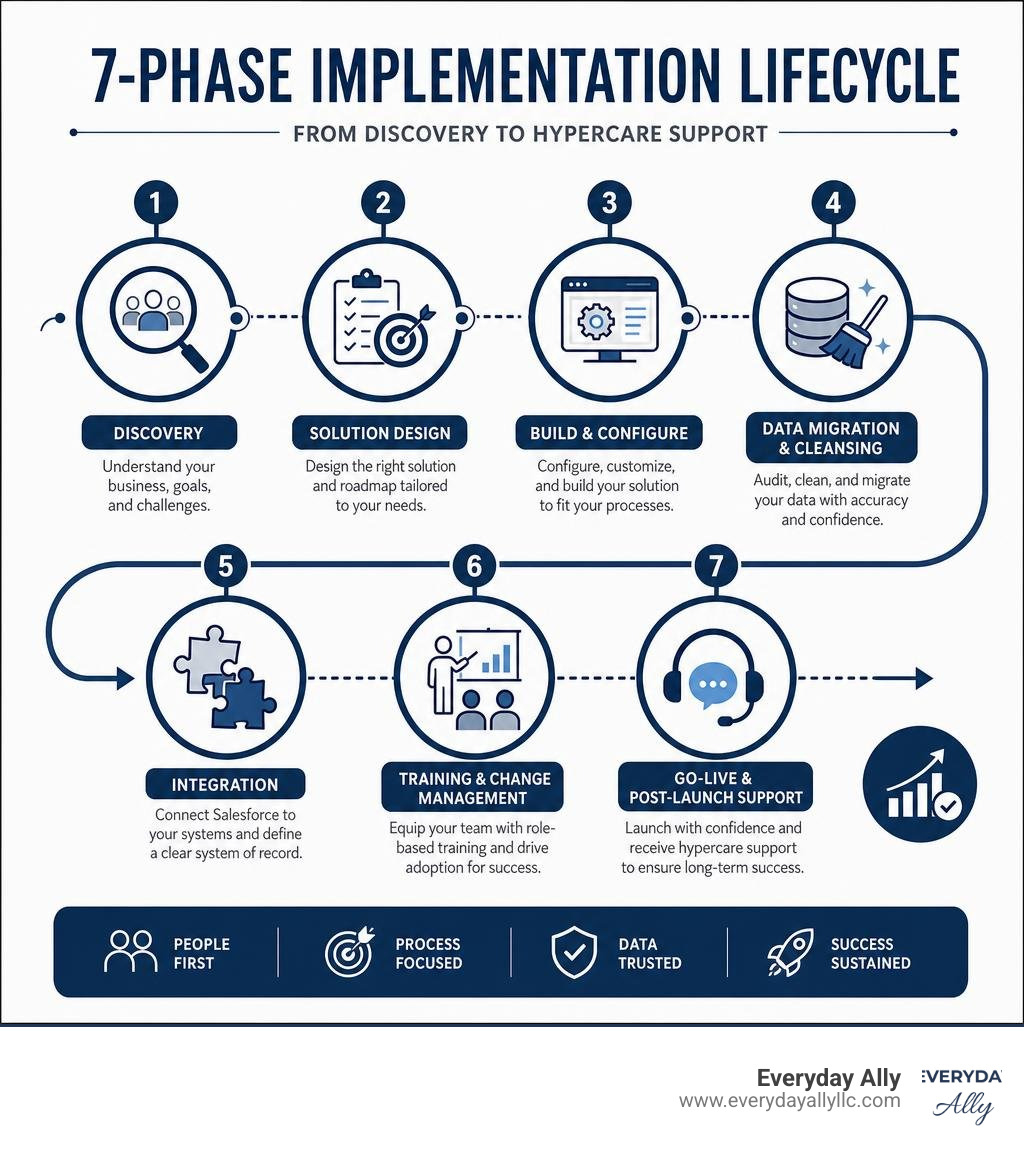
To ensure your system is structurally sound, we follow a highly successful, structured 7-phase roadmap. For a high-level technical overview of this process, you can consult the official Salesforce Implementation Guide - Salesforce Help to understand standard configurations.
Let's walk through these phases step-by-step.
Phase 1 to 3: Discovery, Design, and Configuration
The first three phases of our roadmap lay the foundation for your entire CRM setup.
Phase 1: Discovery & Business Analysis
Before we touch a single setting in Salesforce, we must understand your current business processes, pain points, and goals. We sit down with stakeholders across your departments—sales, marketing, customer service, and IT—to map out how information flows. We ask critical questions: What pain points do you hope to fix? What specific metrics will define success? This is where we separate the "must-have" features for Phase 1 from the "nice-to-have" features for Phase 2.
Phase 2: Solution Design & Architecture
Once we have our blueprint, we design the system. This involves mapping your operational workflows to the Salesforce data model. We design custom fields, define user roles, establish record visibility permissions, and plan how Salesforce will talk to your other business tools.
Phase 3: Configuration & Build
With the design approved, the actual build begins. We configure the platform using Salesforce's built-in, "click-not-code" tools. We build custom fields, page layouts, validation rules, and automated workflows using Salesforce Flow.
A golden rule we always follow is: configure before you customize. Around 78% of Salesforce instances involve significant customizations. However, out-of-the-box configuration is much easier to maintain. We only write custom code (such as Apex triggers or Lightning Web Components) when standard tools cannot meet a highly complex business requirement.
If you want to ensure your system is designed with long-term scalability in mind, partnering with experts for Consulting and Training is the best way to avoid expensive technical debt down the road.
Phase 4 & 5: Data Migration and Integration in Salesforce CRM Implementation
Once the system is built, we have to fill it with your data and connect it to your business ecosystem.
Phase 4: Data Migration & Cleansing
Data migration is the phase most responsible for go-live delays and project failures. The reality is that Salesforce will not fix a bad business process, and it certainly won't fix bad data—it will simply automate your messy data at a faster scale.
Currently, 76% of CRM users report that less than half of their organization's CRM data is accurate and complete. Furthermore, 53% of organizations cite poor data quality as their number-one barrier to AI adoption.
Before migrating, we must audit, clean, and deduplicate your source data. We map every legacy data field to its new home in Salesforce. We then run multiple test migrations in a sandbox environment to validate that the data lands exactly where it should. For a detailed technical walkthrough on preparing your data imports, refer to the Get Started with Sales Cloud Implementation Guide.
Phase 5: Integration
Your CRM shouldn't live on an island. In Phase 5, we connect Salesforce to your existing tech stack, such as your email clients, ERP platforms, or marketing automation software. Whether we are using native AppExchange connectors, middleware like MuleSoft, or custom APIs, we define a clear "system of record" for every data field to prevent data conflicts.
Phase 6 & 7: Training, Go-Live, and Post-Launch Support
The final phases are entirely focused on your people and keeping the system running smoothly.
Phase 6: Training & Change Management
You can build the most advanced Salesforce org in the world, but if your employees do not use it, your return on investment (ROI) will be zero. Shockingly, 53% of organizations state that better onboarding and training would make their CRM significantly more effective.
We don't believe in "one-size-fits-all" training. Instead, we design role-based learning paths tailored to specific user personas (for example, training sales reps on logging opportunities, and customer service agents on managing service cases). This role-tailored approach increases user efficiency by 68%.
Because 70% of information is forgotten within 24 hours without reinforcement, we also build microlearning resources, interactive walkthroughs, and hands-on practice sessions to ensure long-term retention.
Phase 7: Go-Live & Post-Launch Support
After rigorous testing, we execute our go-live checklist and launch the system. We immediately enter a 2-to-4-week "hypercare" support period. During this time, we closely monitor system performance, resolve any unexpected edge cases, and gather direct feedback from users.
To help your team stay aligned and access continuous learning materials post-launch, we recommend utilizing a centralized resource hub like The Ally Hub to keep your team up to speed on platform updates.
Timeline, Costs, and Staffing: In-House vs. Partner
Planning a salesforce crm implementation requires a clear understanding of your timeline, budget, and human resource needs. Let's look at how these elements break down.
| Implementation Aspect | In-House Implementation | Partner-Led Implementation |
|---|---|---|
| Typical Timeline | 3 to 12+ Months (often delayed due to internal priorities) | 4 Weeks to 6 Months (structured, milestone-driven) |
| Upfront Cost | Lower direct fees, but high internal labor costs | Higher upfront consulting fees, but faster time-to-value |
| Risk of Failure | High (often due to lack of certified expertise) | Low (mitigated by certified architects and structured QA) |
| Data Quality & Security | Dependent on internal IT capabilities | Handled by certified data migration specialists |
| Post-Launch Adoption | Often low due to lack of structured change management | High due to customized, role-based training programs |
When budgeting for your project, Salesforce pricing is structured around annual licensing fees, which vary depending on the edition you select (such as Professional, Enterprise, or Unlimited). To evaluate which license tier fits your business, you can explore the official Salesforce Pricing and Licensing Plans. However, keep in mind that your total Year 1 cost will also include implementation services, data migration, integrations, and ongoing support.
Small Business vs. Enterprise Salesforce CRM Implementation
The scale of your salesforce crm implementation depends entirely on the size and complexity of your organization.
Small-to-Medium Businesses (SMBs)
For smaller businesses, the primary goals are speed, simplicity, and budget control. SMB implementations typically focus on core Sales Cloud or Service Cloud features. They often utilize "Quickstart" packages to get up and running in 4 to 8 weeks. Total Year 1 implementation costs for SMBs typically range from $15,000 to $75,000. The focus is on eliminating spreadsheets, automating basic follow-ups, and establishing a clean customer database.
Enterprise Organizations
Enterprise deployments are vastly different. They are usually multi-cloud projects (combining Sales, Service, Marketing, and Experience Clouds) that require deep integration with legacy ERPs or custom databases. These projects involve complex global security requirements, multiple business units, and custom Apex code. Enterprise implementations can take 6 to 18 months and easily exceed $500,000 in services.
No matter your business size, starting with a professional Consultation can help you define a realistic scope, avoid over-customizing, and keep your budget in check.
Choosing Between In-House Teams and Certified Partners
Can you manage a Salesforce rollout completely in-house? Technically, yes—if you have a dedicated, Salesforce Certified Administrator on staff who can commit 20+ hours a week to the build, alongside experienced developers for integrations.
However, relying entirely on an in-house team that has never deployed Salesforce before is highly risky. It often leads to "feature overload," messy data structures, and low user adoption.
To staff an implementation successfully, you need several key roles:
- Executive Sponsor - To champion the project and drive company-wide adoption.
- Business Analyst - To translate your business processes into technical requirements.
- Project Manager - To keep the timeline and budget on track.
- Salesforce Administrator & Developer - To build, customize, and maintain the system.
- Data Migration Specialist - To clean and import your customer records.
Hiring a certified Salesforce partner mitigates these staffing challenges. A partner brings certified architects, developers, and change management specialists to your project on day one. They ensure your system is built correctly the first time, preventing expensive rework. If you are weighing these options, reading through CRM Implementation: A Comprehensive 9 Step Guide | Salesforce can provide deeper insights into the strategic benefits of expert guidance.
Furthermore, if you are looking for local consulting and training resources in Texas, you can evaluate regional experts through the Top Salesforce Consultants in Texas - Jun 2026 Rankings | Clutch.co . For businesses in El Paso, TX, utilizing specialized local programs like Salesforce Training El Paso, TX | ONLC or Salesforce Training Classes El Paso, Texas can be an excellent way to upskill your in-house team during the rollout.
Frequently Asked Questions About Salesforce CRM
Navigating a CRM rollout can feel overwhelming. Here are answers to some of the most common questions we hear from business owners.
How long does a typical Salesforce implementation take?
The timeline depends entirely on scope and complexity. A standard single-cloud deployment for a small-to-mid-market business typically takes 8 to 14 weeks from kickoff to go-live. A highly complex, multi-cloud enterprise deployment with custom integrations and massive data migration can take 6 to 18 months.
What are the primary costs associated with Salesforce CRM?
The total cost of ownership consists of three main parts:
- Salesforce Licenses: Paid annually per user.
- Implementation Services: The cost to design, build, and migrate data (often 2 to 3 times the annual license cost).
- Ongoing Support: Internal admin salaries, training, and continuous optimization.
Be careful to watch out for "hidden costs," such as third-party AppExchange subscriptions, data storage limits, and post-launch training updates.
Why do 30% of CRM projects fail?
CRM projects rarely fail because of the technology itself. The top reasons for failure include:
- Lack of Executive Sponsorship: If leadership doesn't actively use and support the system, the team won't either.
- Dirty Data: Migrating unorganized, duplicate data leads to immediate user frustration.
- Poor User Adoption: Treating training as a brief afterthought rather than a dedicated workstream.
- Over-Customizing: Building complex custom code where standard Salesforce features would have worked perfectly.
Conclusion
A successful salesforce crm implementation is one of the most transformative investments your business can make. It has the power to break down departmental silos, supercharge your team's productivity, and unlock predictive, AI-driven insights that keep you ahead of the competition.
But remember: Salesforce is a journey, not a one-time destination. The businesses that achieve the highest ROI are those that treat their CRM as an evolving asset—continuously optimizing workflows, keeping data clean, and training their teams on new features.
At Everyday Ally, we specialize in helping small and mid-sized businesses in El Paso, TX, throughout Texas, and nationwide navigate this journey with confidence. Our unique strength lies in integrating your Salesforce CRM data directly with your marketing strategy. By connecting these two powerhouses, we help you turn raw customer data into highly qualified leads, streamlined operations, and measurable revenue growth.
Ready to stop guessing and start growing? Let's build a CRM system that actually works for your business. Explore our Salesforce Consulting services today, and let's unlock your business's true potential together.

How to Pick a B2B Social Media Agency Without Getting Ghosted
Why Most B2B Companies Hire the Wrong Social Media Agency

Choosing the right b2b social media agency can be the difference between a pipeline full of warm leads and a lot of pretty graphics that nobody remembers.
Here's a quick overview of what these agencies do and what to look for:
What is a B2B social media agency? A B2B social media agency builds and manages social media programs specifically for companies that sell to other businesses. They focus on LinkedIn, thought leadership, executive visibility, and content that supports long sales cycles — not viral moments or impulse clicks.
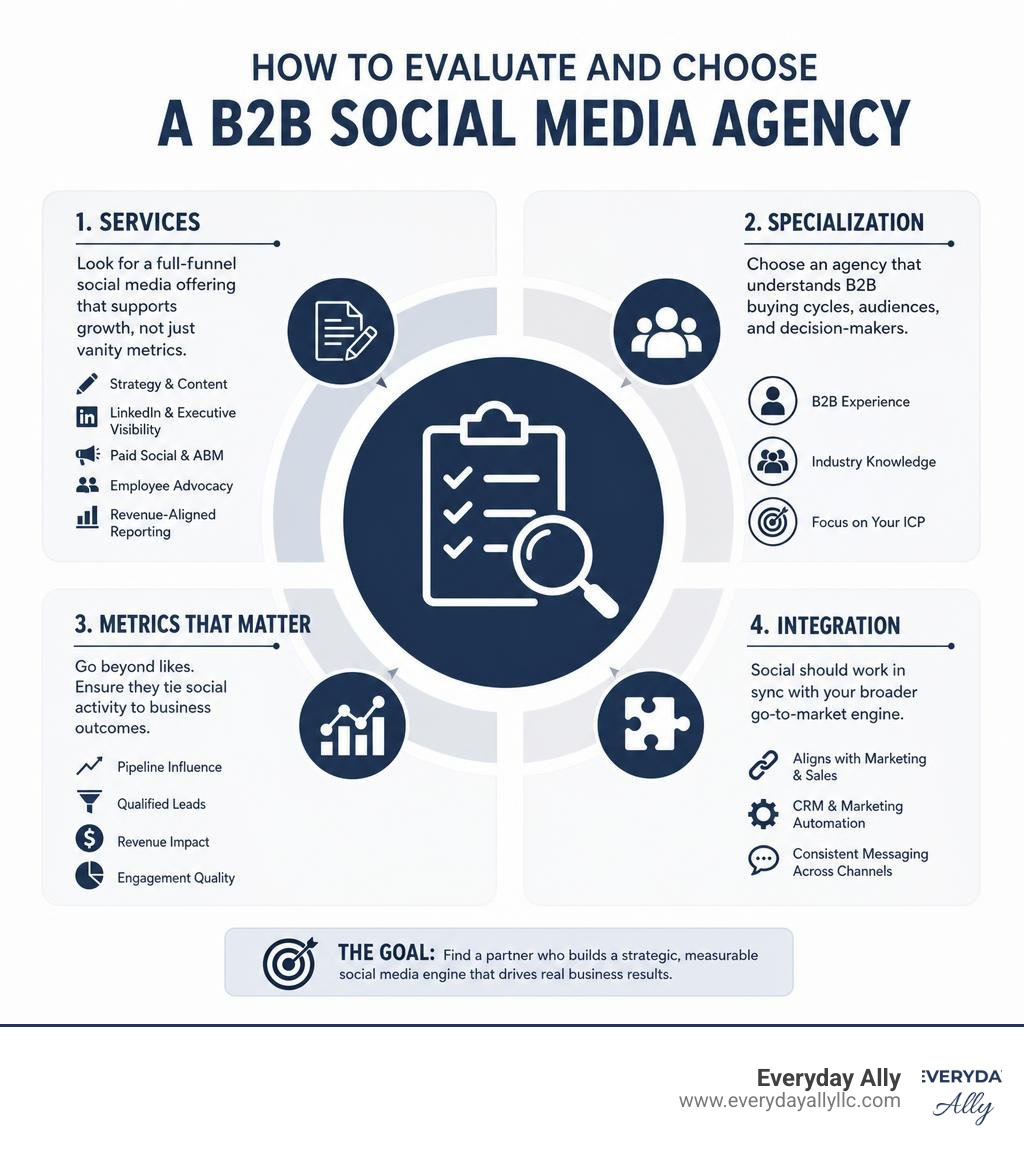
Top things a B2B social agency should offer:
- Organic social strategy and content creation
- LinkedIn management and executive/founder content
- Paid social and account-based marketing (ABM)
- Employee advocacy programs
- Revenue-aligned reporting (pipeline, not just impressions)
Who needs one? Any B2B company struggling to generate consistent leads, build brand trust, or turn social activity into real business outcomes.
Here's the uncomfortable truth: 84% of B2B buyers use social media to find solutions before they ever talk to a salesperson. If your brand isn't showing up with credible, consistent content — your competitors are filling that gap.
Most B2B brands respond to this problem by posting more. More content. More frequency. More noise. But more activity without a system behind it rarely moves the needle.
A specialized B2B social media agency doesn't just create content. It builds the architecture — the strategy, voices, platforms, and measurement — that turns social into a real growth channel.
This guide walks you through exactly how to find one that won't ghost you after the contract is signed.
What is a B2B Social Media Agency (and Why B2C Tactics Fail)?
A specialized b2b social media agency is fundamentally different from a generalist or B2C-focused agency. While a B2C agency tries to spark immediate emotions, trigger impulse buys, or chase viral TikTok dances, a B2B agency understands that your audience consists of highly analytical decision-makers.
In B2B marketing, you are not selling a $20 pair of socks; you are selling a complex, high-ticket software solution, an industrial manufacturing service, or an enterprise consulting package. Because the stakes are higher, the buying process is much more rigorous. To explore how this fits into your broader knowledge base, check out our resources in The Ally Library.
A dedicated B2B agency builds a system that positions your brand as the obvious choice long before a buyer ever requests a demo. They don't just post for the sake of activity; they design platform-native content that respects how modern business professionals actually consume information.
The Core Differences Between B2B and B2C Social
The line between B2B and B2C social media comes down to how decisions are made. To train your internal team on these distinct paradigms, we offer specialized Consulting and Training to help bridge the gap.
- Buying Committees vs. Single Buyers: B2C social targets one person making a quick decision. B2B social must speak to a buying committee. Your content needs to build trust with the end-user, the department head, the CFO, and the IT security specialist simultaneously.
- Sales Cycle Velocity: B2C purchases happen in seconds or days. B2B sales cycles regularly span 6 to 18 months. B2B social media is an exercise in persistence, nurturing prospects at every stage of their evaluation journey.
- Platform Ecosystems: While B2C brands dominate Instagram and TikTok, B2B brands live and die by professional networks. LinkedIn is the undisputed heavyweight here—84% of B2B marketers say LinkedIn delivers the absolute most value among organic channels.
- Trust Over Virality: A viral meme might sell consumer products, but it won’t sell enterprise software. B2B buyers are 67% more likely to engage with brands that demonstrate clear, credible thought leadership on social media.
Why In-House Teams Struggle Without a Specialized B2B Social Media Agency
Many businesses start by assigning social media to an in-house generalist or a junior marketing coordinator. While well-intentioned, this approach quickly hits a ceiling for several reasons:
- Content Fatigue and the "Activity Trap": Without a dedicated system, in-house teams default to posting generic company updates, press releases, or product feature lists. This content is dry, interchangeable with competitors, and ignored by buyers.
- Constant Algorithm Shifts: Social platforms change their algorithms constantly. For example, LinkedIn shifted its algorithm priorities heavily between 2023 and 2025, rewarding deep expertise and punishing outbound link spam. A specialized agency spends all day tracking these changes so you don't have to.
- Production Consistency: Creating high-quality vertical videos, custom graphics, and written thought leadership week after week requires a diverse creative engine. An in-house team of one or two people simply cannot match the production output and creative depth of a dedicated agency team.
- Platform-Native Depth: To stand out, you need platform-specific playbooks. Reposting the exact same PDF link with the same caption across LinkedIn, X, and YouTube doesn't work. Specialized agencies know how to adapt a single core asset into a native text post for LinkedIn, a short-form video for YouTube, and a discussion thread for Reddit.
5 Core Services to Expect from a Top-Tier Partner
When evaluating a potential b2b social media agency, look beyond basic "scheduling and posting." A strategic partner offers a comprehensive suite of services designed to build authority, capture demand, and nurture your pipeline. To see how we integrate these elements locally, explore our Marketing Services El Paso.

Organic Social and Thought Leadership
Organic social is your brand's digital handshake. The best agencies focus on building a compounding organic presence centered around executive branding and founder-led content.
People trust people far more than they trust logo-branded corporate pages. Top agencies interview your executives, extract their unique perspectives, and ghostwrite platform-native posts that position them as industry authorities.
They also leverage high-performing formats like LinkedIn Newsletters (which convert company followers into subscribers at an impressive 10% to 25% rate) and lo-fi vertical video. In fact, raw vertical video shot on a smartphone regularly outperforms high-production corporate videos on LinkedIn by 2x to 3x in engagement.
For a deeper dive into structuring these plans, you can review this guide on how to Create a successful social media plan - Nationwide .
Paid Social and Account-Based Marketing (ABM)
Organic social builds the foundation of trust, but paid social accelerates your reach. A top-tier agency doesn't just "boost posts"; they design sophisticated paid campaigns aimed at demand generation and pipeline acceleration.
By utilizing LinkedIn’s robust professional targeting, an agency can run highly targeted Account-Based Marketing (ABM) campaigns. This means your ads are only shown to key decision-makers at a specific list of target accounts. Instead of chasing cheap clicks, paid social is used to distribute high-value ungated content or promote targeted events directly to the people who hold the budget.
B2B Influencer Marketing
Influencer marketing isn't just for lifestyle brands. In the B2B world, partnering with respected industry analysts, creators, and consultants is one of the fastest ways to build credibility. A specialized agency will source, vet, and manage relationships with key creators your buyers already follow, ensuring your brand is integrated into trusted industry conversations.
Employee Advocacy Programs
Your employees are your greatest marketing asset. Their collective networks are often 10x larger than your corporate page's reach. A great agency will build an employee advocacy framework—providing your sales, customer success, and product teams with pre-approved, easy-to-share social assets that amplify your brand's reach naturally.
Comprehensive Social Media Management
This is the operational engine. It includes end-to-end channel management, community management (responding to comments and engaging with target accounts), and setting up robust governance models. Especially for mid-market and enterprise brands, having clear approval workflows and escalation paths is critical to maintaining brand safety.
How a B2B Social Media Agency Drives Real Revenue (Not Just Impressions)
The biggest frustration B2B executives have with social media is the focus on vanity metrics. Likes, shares, and impressions are nice, but they don't pay the bills. A strategic agency partner shifts the conversation from "How many views did we get?" to "How much pipeline did we influence?"
| Metric Category | Vanity Metrics (The Old Way) | Revenue-Aligned KPIs (The Agency Way) |
|---|---|---|
| Awareness | Raw Impressions, Follower Count | Share of Voice, Target Account Reach |
| Engagement | Likes, Random Comments | High-Value Comments, Direct Messages (DMs) |
| Conversion | Link Clicks, PDF Downloads | Self-Reported Attribution, Inbound Leads |
| Pipeline | Cost-Per-Click (CPC) | Pipeline Velocity, Influenced Revenue |
To align your business goals with this revenue-focused mindset, we recommend exploring our curated insights in The Ally Library.
To drive real business outcomes, agencies focus heavily on navigating "dark social"—the private channels where B2B buyers actually make decisions, such as Slack communities, direct messages, and internal group chats. By creating highly shareable, point-of-view-driven content, agencies ensure your brand is mentioned in those private rooms.
How a B2B Social Media Agency Integrates with CRM and RevOps
To prove that social media is actually driving revenue, your agency must work hand-in-hand with your Revenue Operations (RevOps) team and your CRM. This is where the magic happens.
By integrating social media tracking with your CRM, you can move past flawed last-click attribution models. A sophisticated setup allows you to:
- Track Multi-Touch Journeys: See how a prospect first engaged with an executive's LinkedIn post, later clicked a retargeting ad, and eventually requested a demo.
- Implement Lead Scoring: Assign points to target accounts when their employees actively engage with your social content, signaling high intent to your sales team.
- Measure Pipeline Velocity: Analyze whether prospects who engage with your social content move through your sales pipeline faster than those who don't.
At Everyday Ally, we specialize in helping mid-sized businesses bridge this exact gap. Through our Salesforce Consulting services, we connect your marketing data directly to your sales pipeline, giving you complete visibility into which social campaigns are actually driving closed-won revenue.
The Step-by-Step Checklist to Evaluate and Choose Your Partner
Choosing an agency is a major investment. To ensure you find a true partner rather than a vendor that disappears after onboarding, use this step-by-step evaluation framework. If you are looking for localized expertise in Texas, you can review our Marketing Services El Paso to see how we align with these exact standards.

- Check Their B2B Track Record: Ask for specific case studies. Look for real-world examples of how they’ve helped similar brands. For example, did they help a client achieve a 100%+ increase in LinkedIn followers or a 332% lift in organic social engagement? Look for proof of compounding systems, not just one-off viral posts.
- Evaluate Their Own Social Presence: If a b2b social media agency has a dead LinkedIn page, a boring executive presence, or doesn't publish original thought leadership, they cannot build a successful program for you. They should practice exactly what they preach.
- Understand Their Team Structure: Ask who will actually be working on your account. Will you have a senior strategist leading the program, or will your brand be handed off to a junior coordinator? You want a team that includes a dedicated strategist, a copywriter who understands your industry, and a creative designer.
- Assess Their Integration Capabilities: How do they integrate with your other marketing channels? A great social strategy doesn't exist in a vacuum. It should feed into and support your SEO, content marketing, and email campaigns.
- Review Their AI and Modern Tech Stack: In 2026, leading agencies leverage AI for deep audience intelligence, social listening, and content distribution systems, while ensuring that the actual creative copy remains highly human and original.
Assessing Specialization and Industry Fit
Not all B2B companies are the same. A SaaS company has different marketing needs than a heavy industrial manufacturer or a cybersecurity firm.
- Cybersecurity & Deep Tech: Require agencies with deep technical writers who can speak authoritatively to CISOs and engineers without sounding superficial.
- SaaS & Growth-Stage Tech: Need agile agencies focused on rapid demand generation, product-led growth content, and highly measurable paid campaigns.
- Manufacturing & Industrial: Require agencies that excel at translating complex, physical engineering processes into engaging visual stories and vertical videos.
To help your team identify the right industry alignment and develop internal capabilities, we offer tailored Consulting and Training.
Frequently Asked Questions About B2B Social Media Agencies
How long does it take to see results from a B2B social media agency?
Generally, you will see early momentum—such as increased engagement, higher-quality comments, and growth in target account reach—within the first 60 to 90 days. However, because B2B sales cycles are naturally long, true revenue-aligned results and pipeline influence typically require 6 months of consistent, strategic execution to compound.
What platforms should a B2B brand focus on in 2026?
LinkedIn remains the absolute priority for almost every B2B brand due to its unmatched professional targeting. However, YouTube is highly valuable for long-form educational content, and Reddit is increasingly important for community engagement. Even platforms like TikTok can work if your target audience uses them for professional development, but your platform selection should always be guided by where your specific buyers actually spend their time.
How do you measure the ROI of organic B2B social?
The most effective way to measure organic B2B social ROI is by combining self-reported attribution (adding a "How did you hear about us?" free-form field to your demo forms) with UTM tracking and CRM data. This allows you to see when buyers mention your social content as their primary discovery source, even if they didn't click a direct trackable link.
Conclusion
Hiring a b2b social media agency is one of the smartest ways to scale your brand's authority, build deep trust with buyers, and warm up your sales pipeline. But to get the most out of your agency partner, their creative strategies must align with your internal business systems.
At Everyday Ally, we believe that marketing is only as good as the data behind it. We help small and mid-sized businesses across Texas and nationwide integrate their marketing strategies directly with Salesforce CRM. This ensures that every lead generated on social media is tracked, scored, and nurtured effectively, turning social media from a brand checkbox into a predictable revenue driver.
Ready to stop random posting and start building a strategic, CRM-integrated social engine? Let's talk. Explore our Marketing Services El Paso today and take the first step toward social media that actually grows your business.

Marketing Support for Service-Based Businesses (Without Hiring a Full Team)
No marketing team? No problem. Everyday Ally helps service-based businesses execute marketing consistently and generate more leads.
Many service-based businesses struggle with marketing—not because they lack ideas, but because they don’t have the time or internal team to execute consistently.
If you’re trying to manage social media, generate leads, follow up with prospects, and run campaigns on your own, it quickly becomes overwhelming.
This is where structured marketing support makes a difference.
Why Marketing Is Difficult Without a Dedicated Team
Without a dedicated marketing team, most service-based businesses face:
Inconsistent social media and content marketing
Limited time for campaign execution
Poor lead tracking and follow-up processes
Lack of a clear marketing strategy
Missed opportunities to convert leads into clients
Over time, this leads to low visibility, slower growth, and unpredictable revenue.
What Is Marketing Support for Service-Based Businesses?
Marketing support is an ongoing, structured approach to managing your marketing activities without hiring a full-time team.
Instead of relying on scattered efforts or traditional agencies, businesses benefit from consistent execution, clear systems, and a partner who helps turn strategy into action.
Everyday Ally provides this type of support by helping service-based businesses stay consistent, organized, and focused on growth.
How Everyday Ally Supports Your Marketing
1. Consistent Content Marketing Execution
Consistency is one of the most important factors in successful marketing.
Everyday Ally helps service-based companies:
Plan and schedule social media content
Maintain consistent posting across platforms
Repurpose content for multiple channels
Support blog and email marketing efforts
This ensures your business stays visible and relevant to your audience.
2. Turning Marketing Ideas into Action
Many business owners know what they should be doing but lack the time to execute.
Everyday Ally helps bridge that gap by:
Turning ideas into actionable marketing plans
Drafting and managing campaigns
Ensuring consistent follow-through
No more stalled initiatives or half-finished marketing efforts.

Turn Ideas Into Action with Everyday Ally
3. Improving Lead Management and Follow-Up
Marketing and sales go hand in hand.
Everyday Ally helps service-based businesses improve their sales process by:
Organizing and maintaining CRM systems
Tracking leads and follow-ups
Supporting outreach and client communication
Improving lead conversion through consistency
This helps businesses capture and close more opportunities.
4. Build Simple, Effective Marketing Systems
Without systems, marketing becomes reactive and inconsistent.
Everyday Ally helps implement:
Content calendars
Lead tracking workflows
Campaign planning structures
Basic reporting and performance tracking
These systems create clarity, efficiency, and momentum.
5. A Cost-Effective Alternative to Hiring a Marketing Team
Hiring an internal marketing team can be expensive and time-consuming.
Everyday Ally offers a flexible alternative by providing:
Ongoing marketing execution support
No long-term hiring commitments
Scalable support based on business needs
A partner who understands your business operations
This makes it easier for service-based companies to grow without increasing overhead.
Who Is this Right For?
Marketing support from Everyday Ally is ideal for:
Service-based businesses without internal marketing teams
Founders managing marketing on their own
Companies struggling with consistency and execution
Businesses that need structured marketing support without hiring full-time staff

How to Market Your Service Business Without Hiring a Team
Create content consistently (even if it’s simple)
Use a content plan based on what your audience is searching
Track leads and follow up regularly
Build basic systems to stay organized
Get support to maintain execution
Consistency and structure will always outperform random effort.
Final Thoughts: Consistent Execution Drives Growth
If your service-based business lacks an internal marketing team, the solution isn’t more ideas—it’s consistent execution.
Everyday Ally provides the marketing support, structure, and reliability needed to stay visible, generate leads, and grow your business—without the cost and complexity of building a full team.